How to Choose a POS System for Attractions and Entertainment Venues

Key takeaways
- Generic POS systems aren’t built for venues that manage timed sessions, capacity limits, waivers, and memberships all at once.
- The right POS for an attraction connects bookings, payments, and guest data in one system so your team isn't stitching things together manually.
Choosing a point-of-sale (POS) system can seem straightforward at first. You compare pricing, review feature lists, and narrow down a few familiar options that appear to cover the basics.
But attractions don’t operate like retail stores or restaurants, and that’s where the gap shows up.
You’re not just processing payments, you’re managing timed sessions with fixed capacity, coordinating online and walk-up bookings, collecting waivers, handling memberships, and running group events, often all at once. When the system can’t support that complexity, gaps appear quickly, and teams are forced into manual workarounds and disconnected tools.
Many operators only realize afterward that the issue wasn’t the wrong setup, but the wrong type of system altogether.
This guide breaks down how to choose a POS system that actually fits how attraction venues operate.
Why most POS systems aren't built for attractions
Most operators follow a familiar path, and it usually starts with good intentions but limited context. You’re opening a family entertainment center or upgrading from a system that no longer works, so you begin researching POS options and comparing what’s available.
On the surface, the options feel interchangeable because they all handle payments, offer modern interfaces, and promise to cover the essentials. Some even bundle hardware or offer attractive pricing, which makes the decision feel both practical and cost-effective.
Where things start to break
Then, a few weeks after launch, the problems begin to surface and compound quickly.
Your online booking system doesn’t sync with your POS in real time, so Saturday parties are double-booked, and your team is left to resolve conflicts manually. Your laser tag sessions are capped at 20 players, but there’s no way to enforce that limit at checkout, so you either oversell or rely on staff to track capacity separately. Waivers are printed and signed on paper, which slows down check-in and increases risk, while memberships require recurring billing that the POS simply doesn’t support.
At that point, it becomes clear that the issue isn’t training or configuration, because the system was never designed for this type of operation.
Generic POS systems are built around products and transactions, whereas attractions operate around sessions, time slots, and experiences, and that difference shapes everything. A restaurant needs to know how many items it sold, but an attraction needs to know who is booked for a specific time, whether they’ve signed a waiver, what add-ons they selected, and whether their visit counts toward a membership.
What a POS for attractions does
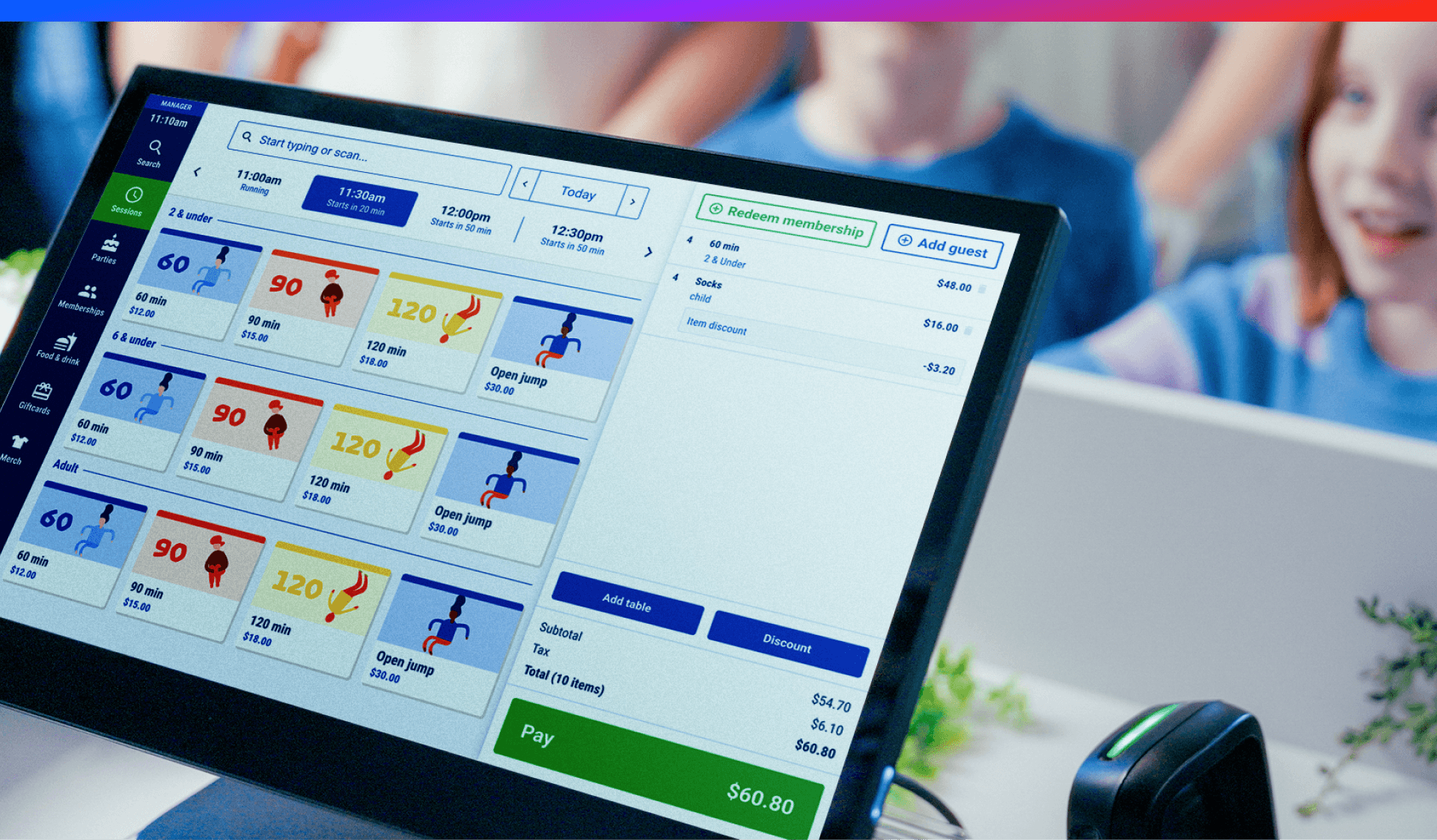
An attraction-ready POS does more than process payments because it connects booking, operations, and guest experience into a single system, and each part needs to work together without friction.
These are the core POS system features that matter most in an attraction environment, where operations depend on real-time coordination across bookings, capacity, and guest experience.
|
Feature |
Why it matters for attractions |
|
Most guests book in advance, so your POS must sync with online reservations in real time and prevent overbooking while eliminating manual reconciliation. |
|
|
You’re selling time-bound experiences with fixed limits, so the system must enforce capacity by session and not just track daily totals. |
|
|
Digital waivers should be collected and stored automatically at checkout, and anything less introduces risk and operational friction. |
|
|
Recurring billing, usage tracking, blackout dates, and family plans require built-in logic, and workarounds quickly become unmanageable. |
|
|
Add-ons are tied to experiences, so the system must bundle and price them correctly within a single transaction. |
|
|
Large bookings require deposits, balance tracking, and coordination details, and all of it must live within one unified reservation. |
|
|
You need visibility by session, attraction, and time slot, so you can make operational decisions based on how your business actually runs. |
Each of these capabilities goes beyond a simple feature, because the value comes from how they work together rather than how they function in isolation.
For example, a Family Entertainment Center (FEC) POS system with a real-time booking integration means that when a guest books a 2 pm session online, that spot is immediately unavailable across all channels, and anything less creates gaps where capacity can be oversold. Session management introduces another layer of complexity because attractions operate on overlapping schedules, varied capacities, and different requirements, and generic systems aren’t built to handle that without manual intervention.
The same pattern shows up with waivers, memberships, and group bookings, because they are not edge cases but core parts of how attractions operate and generate revenue.
Read more: See how Innoflate & Pinz Bowling Group Increased Revenue Per Guest by 15% with ROLLER’s POS software
Generic POS vs. Attraction-specific POS
The distinction becomes clearer when you compare capabilities directly, because the strengths of one system often highlight the gaps in the other.
What generic POS systems typically handle:
- Payment processing
- Daily sales tracking
- Basic inventory management for physical products
- End-of-day reporting and reconciliation
What generic POS systems miss for attractions:
- Time-based inventory and session logic
- Automatic capacity enforcement that prevents overbooking
- Real-time synchronization between online and in-person sales
- Integrated digital waivers
- Membership billing and usage tracking
- Reporting by session, attraction, or experience type
- Cohesive group booking workflows
9 questions to ask a POS vendor before you buy
A feature list can look complete, but it often hides limitations, so the best way to evaluate a system is to ask direct questions and listen carefully to both what they say and how they say it.
1. Does the POS integrate with online booking in real time, or does it sync on a delay?
Look for real-time, two-way synchronization where inventory updates instantly across all channels. If they mention batch syncing, delays, or “near real-time,” that’s a red flag.
2. Can it manage capacity by session, not just daily totals?
Native session-based capacity controls with hard limits that automatically prevent overbooking. If they describe manual adjustments or workarounds, it’s not built for attractions.
3. How are waivers handled, and are they fully integrated into the checkout flow?
Digital waivers collected before or during checkout, are automatically linked to each guest and stored in the system. If waivers live in a separate tool or require follow-up emails, expect gaps.
4. Does it support recurring billing for memberships while also tracking usage?
Look for a system that handles membership billing, tracks visits or redemptions, enforces rules like blackout dates, and ties everything back to the guest profile. Billing without usage tracking is incomplete.
5. Can it bundle activities, F&B, and add-ons within a single transaction?
Flexible bundling that allows packages, upsells, and add-ons to be combined easily, priced correctly, and reported accurately. If it requires creating dozens of custom SKUs, it won’t scale.
6. How are group bookings managed, including deposits, balances, and headcount changes?
Your software should have a single booking record that supports deposits, tracks remaining balances, allows headcount adjustments, and stores notes or coordination details. If they treat group bookings as multiple transactions, it will get messy.
7. What does reporting look like by session, attraction, and time of day?
Built-in reports that reflect how attractions operate, including revenue by time slot, utilization rates, and performance by attraction, can help you better understand your venue’s performance.
8. Can the system scale across multiple locations without creating operational silos?
Look for multi-location support with centralized reporting, shared guest data, and consistent workflows. If each location operates independently, scaling becomes harder.
9. What costs are excluded from the base price, and how do they add up over time?
Check if the pricing includes software, hardware, transaction fees, support, and add-ons.
What to watch out for: Common mistakes when choosing an attraction POS
Even when operators understand the gaps between generic and attraction-specific systems, it’s still easy to make decisions that feel reasonable in the moment but create long-term friction. Most of these mistakes come from focusing too narrowly on price, features, or short-term needs, rather than on how the system will actually perform under real operating conditions.
The result is often the same: A platform that looks fine during the sales process but starts to strain once bookings, staffing, and guest flow get more complex.
These are the most common mistakes to avoid when evaluating a POS system for an attraction:
Buying based on price alone
A lower monthly fee can seem like a win, but it often leads to higher costs over time because you’ll need additional tools and manual processes to fill the gaps.
Confusing ticketing with POS
Ticketing gets guests in the door, while POS handles everything else, so treating them as interchangeable creates operational blind spots. A modern attraction ticketing system needs to go beyond entry management and connect directly with POS, capacity, and guest data in real time.
Choosing a restaurant POS for F&B
Restaurant workflows are built around tables and courses, while attraction concessions are tied to bookings and bundles, so the systems are fundamentally different.
Assuming integrations will work seamlessly
Vendors often claim integrations exist, but the real question is how they function in practice and whether they require manual intervention.
Ignoring scalability
A system that works for one location may not support growth, and switching systems later becomes significantly more complex.
Overlooking daily usability
If routine tasks require too many steps, your staff will feel the friction immediately, and that friction will impact the guest experience.
Next steps
Choosing the right venue management POS system is less about finding software that checks the most boxes and more about finding a platform that actually reflects how your attraction operates day to day. When sessions, capacity, waivers, memberships, and group bookings all depend on the same system working in real time, even small gaps in functionality can turn into constant operational friction. The right system should reduce complexity, not create it, and it should support your team in delivering a smooth guest experience without relying on manual fixes or disconnected tools.
Book a demo to explore how ROLLER brings booking, POS, waivers, memberships, and reporting together in one platform.
Frequently asked questions about choosing a POS system
What is a POS system for attractions?
A POS system for attractions like ROLLER is software designed specifically for venues like family entertainment centers, trampoline parks, escape rooms, and amusement parks, and it handles ticketing, capacity management, waivers, memberships, F&B sales, and group bookings, all built around session-based and time-slot operations rather than simple transactions.
Can I use a generic POS system for my FEC or attraction?
Yes, you technically can use a generic POS system for an FEC or attraction, but in practice, you’ll run into limitations quickly because most generic systems don’t support session-based capacity, real-time booking integration, waiver management, or recurring memberships, which means you’ll likely need additional tools and workarounds.
What features should an attraction POS system have?
An attraction POS system should include real-time online booking integration, session and capacity management, digital waiver collection, membership and pass management, F&B and add-on bundling, group event booking tools, and reporting that breaks down performance by session, day, and attraction type.
What is the difference between a ticketing system and a POS system?
A ticketing system handles admissions and reservations, while a POS system handles the full range of transactions, including tickets, concessions, retail, add-ons, and memberships, and for attractions these two functions need to be integrated so that online and in-person sales operate as one system.
Does an attraction POS need to integrate with online booking?
Yes, an attraction POS needs to integrate with online booking in real time because most revenue comes from advance reservations, and without real-time sync between systems, operators risk overselling sessions, creating guest frustration, and spending significant time reconciling data.
Related articles
.webp)
Point of Sale
Point of Sale Analytics: Turn POS Data Into Smarter Decisions
December 19, 2025
|
7 mins
.webp)
.jpg)
.jpg)