Why Attractions Need an Integrated POS System
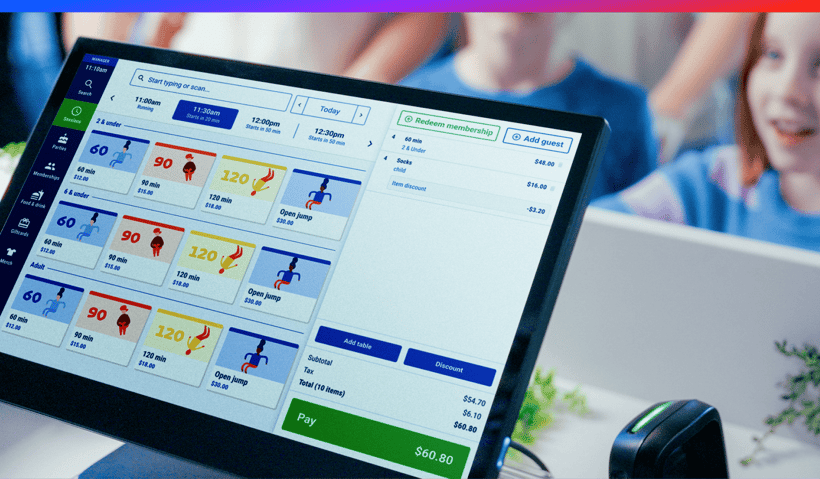
Key takeaways
- Generic POS systems process payments, but they don't connect to your bookings, capacity, or memberships, which means your team ends up stitching everything together manually.
- An integrated POS keeps all of that in sync in real time, so staff can check guests in faster, avoid overselling sessions, and see revenue across your whole operation in one place.
- The right system should also surface relevant upsells at the point of sale, recognize members automatically, and remove end-of-day reconciliation work.
Your front desk is checking guests in on one screen, processing food and retail on another, and cross-referencing bookings on a third. At the end of the day, someone still has to manually reconcile it all and hope the numbers line up. That’s what running a venue on a generic point-of-sale (POS) system looks like, and most operators don’t realize there’s a better way.
The issue isn’t your team, it’s the systems. You’re asking tools that were never built to work together to stay in sync. Generic POS works for simple transactions, but attractions aren’t simple. You’re managing timed sessions, capacity, waivers, and multiple revenue streams that need to connect in real time.
This article breaks down what an integrated POS looks like for attraction venues, why disconnected systems create friction that worsens as you grow, and what to look for instead.
What is an integrated POS system?
An integrated POS system connects in real time with core operations tools like booking, ticketing, inventory, reporting, and memberships, so all data flows through one system. When a guest books, staff see it instantly. When a sale is made, reporting and inventory updates automatically. When a member checks in, the system already recognizes their access and history.
Unlike a standalone POS, which only processes transactions at the terminal, POS integration allows your system to operate in context. A standalone POS doesn’t account for bookings, capacity, or memberships outside that sale, forcing staff to piece information together across tools.
This matters because venues rely on coordination, not isolated transactions. Without integration, every step between booking and visit adds friction, delays, or manual work to keep systems aligned.
Why generic POS systems fail at attraction venues
Generic POS systems were built for a different world. A coffee shop needs fast payment processing. A retail store needs inventory tracking by size and SKU. Those are valid use cases, but they don’t reflect how an attraction venue actually operates.
Disconnected booking and payment workflows
Here’s where the mismatch shows up in practice:
A family books a birthday party online for 15 kids and prepays, then arrives early and adds food and drinks. Staff have to switch between systems to confirm what’s already been paid for, since the booking system and POS don’t align. The transaction is completed in one place and recorded in another, requiring manual reconciliation later to ensure revenue is accurate.
Now multiply that across dozens of parties, walk-ins, memberships, and activities, and teams spend their time stitching together disconnected data just to understand what happened.
Capacity management breaks without a system connection
The issue gets even sharper with capacity. A trampoline court might have a strict 50-person limit to ensure safety and quality of experience. If your POS doesn’t connect to your booking system, staff have to manually check availability before selling walk-ins.
One missed check or a near-simultaneous online booking, and you’ve oversold. That either leads to turning guests away or running an unsafe session.
Fragmented reporting slows down decision-making
Reporting is where the friction becomes unavoidable. Most venues want simple answers. What drove revenue: parties, walk-ins, or members? Which add-ons are actually working? How does performance shift by time of day or day of week?
With disconnected systems, getting those answers means exporting data from multiple places, cleaning spreadsheets, and manually merging everything. Insights always lag behind reality.
Comparing standalone POS systems vs integrated POS systems
|
Standalone POS |
Integrated POS |
|
No connection to booking or ticketing systems |
Real-time sync across bookings, ticketing, and sales |
|
Manual capacity checks required |
Capacity updates automatically in real time |
|
Separate reporting by system |
Unified reporting across all revenue streams |
|
No recognition of memberships or perks |
Automatic member recognition and pricing |
|
Generic upsells unrelated to context |
Context-aware upsells tied to bookings and behavior |
|
Staff toggles between multiple tools |
Single connected interface |
|
Requires end-of-day reconciliation |
Automated data sync removes reconciliation work |
|
Limited to in-person transactions |
Connects online, walk-in, and pre-booked sales |
What an integrated POS actually does differently
An integrated POS is fundamentally about context, giving you real-time visibility across your venue so you always know who’s booked, who’s checked in, what’s at capacity, and how everything connects. Here are the features that make it stand out:
Real-time booking and transaction sync
At check-in, the system automatically pulls up the guest’s booking. Staff members don’t have to toggle between tools or guess what’s been paid for. Everything is already connected, so bookings and POS transactions stay aligned from the moment a reservation is made to the moment the guest walks out.
This eliminates confusion at the front desk and ensures every transaction is tied to the correct visit.
Capacity-aware selling
Because bookings and sales are synced in real time, staff can’t oversell a session. If a time slot is full, it’s reflected everywhere instantly, including online and at the front desk.
This removes the need for manual availability checks and prevents double-bookings during peak times, when mistakes are most likely to happen.
Membership recognition and automation
An integrated system recognizes members automatically at check-in. It applies the correct pricing, tracks usage or visit limits, and keeps membership details tied to every transaction.
It also flags renewal timing so staff can proactively prompt extensions or upgrades instead of managing memberships manually or inconsistently.
Contextual upsells at the point of sale
Instead of generic prompts, the system uses booking context to guide recommendations. If a family checks in for a basic session, staff may see relevant suggestions like food packages, photo add-ons, or extended playtime based on what similar guests typically purchase.
This creates more relevant upsells that feel natural rather than scripted.
Unified reporting across revenue streams
All sales data flows into a single system, so reporting doesn’t require exporting and merging spreadsheets from multiple tools.
Operators can see revenue broken down by bookings, walk-ins, memberships, activities, and add-ons in one place. More importantly, they can connect performance patterns to behavior, such as which session types generate the most spend per guest or which marketing channels drive higher-value visits.
The hidden cost of disconnected systems
Staff time lost to manual reconciliation
When systems don’t talk to each other, staff are constantly re-entering, cross-checking, and fixing data across platforms. A booking gets duplicated. A refund gets logged in one system but not another. A member discount is applied correctly at the counter, but never reflected in reporting.
Each correction takes only a few minutes, but across hundreds of transactions per week, it becomes a steady drain on staff time and focus.
Revenue loss from human error
Manual data entry introduces small but compounding errors. A missed upsell. A misattributed booking. A discount applied inconsistently across systems. None of these feel significant in isolation, but together they create revenue leakage that is hard to track and even harder to recover.
Over time, this leads to reporting that looks accurate on the surface but doesn’t fully reflect actual performance.
Missed upsell opportunities at the point of sale
Disconnected systems also reduce revenue in real time. When staff have to switch between screens to complete a transaction, the natural upsell moment disappears.
The guest is ready to pay, card in hand, but the interaction slows down as staff move between systems to confirm details and piece together what’s available. By the time everything is sorted, the natural moment to suggest an add-on is gone.
Overselling capacity
When booking and POS systems aren’t connected, capacity management becomes manual and fragile. That creates two costly outcomes.
Either guests are turned away at the door, leading to refunds, service recovery costs, and reputational damage. Or the venue runs over capacity, which impacts safety, staff workload, and the overall guest experience.
Both scenarios carry real financial and operational costs.
Poor visibility leads to poor decisions
Disconnected data also weakens decision-making. Without a clear view of what is actually driving profit, operators are forced to rely on partial information or instinct.
That can mean continuing promotions that drive bookings but not margin, or underinvesting in high-performing add-ons simply because their impact is hidden across systems. Over time, this leads to decisions that quietly erode profitability.
What to look for in a POS system for your venue
Not all integrated POS systems are built for attraction venues. The right one should reduce friction across operations, not just process payments. Use this checklist to evaluate what actually matters.
1. Real-time booking integration
The POS should connect directly to your booking system so that data updates instantly. When a guest checks in, their reservation, payment status, and package details should already be visible without manual lookup or syncing delays.
2. Capacity awareness
Your system should track capacity by activity type and time slot in real time. It should automatically prevent overselling and reflect availability consistently across online booking and front desk sales.
3. Membership and pass recognition
Look for support for more than basic loyalty programs. The system should handle memberships with visit limits, expiration dates, guest privileges, and tiered pricing, and apply those rules automatically at checkout and check-in.
4. Multi-revenue-stream reporting
Reporting should be unified across your entire operation. You need visibility into revenue from bookings, walk-ins, parties, memberships, food and beverage, retail, and add-ons, without exporting and combining spreadsheets.
5. Waiver and check-in handling
Your POS should connect with waiver completion and check-in status so staff don’t have to verify manually. The system should clearly show who has checked in and who still needs to complete requirements.
6. Context-aware upsell prompts
Upsells should be driven by booking context, not generic scripts. The system should surface relevant add-ons based on what the guest booked, what they’re checking into, and what similar guests typically purchase.
7. Staff permissions and roles
The system should support role-based access so staff only see what they need. Front desk teams can process transactions, while managers handle refunds, reporting, and higher-level settings, without workarounds or shared logins.
8. Cloud-based access
You should be able to view bookings, revenue, and capacity from anywhere. This is especially important for operators managing multiple locations or making decisions outside the venue.
9. Flexible payment processing
An integrated payment system should support multiple payment types, including credit cards, cash, digital wallets, gift cards, account credits, and split payments, without forcing rigid workflows on guests or staff.
10. Inventory management
For venues with retail or F&B, the POS should track inventory in real time and flag low stock automatically so you can reorder before it becomes an issue.
How integrated POS works for different venue types
Different attractions have very different operational challenges, but the right POS and booking system adapts to each one by connecting capacity, payments, and guest activity in real time.
Family entertainment centers
Family entertainment centers manage a complex mix of revenue streams, from attractions and arcade play to food, merchandise, and parties. A connected POS and booking system brings all of this into one flow, so a game card reload, food order, and party package sit under a single guest profile. This reduces revenue loss and avoids confusion around what’s included in party packages versus add-ons, especially during high-volume weekends.
Trampoline parks
For trampoline parks, capacity control is the biggest operational risk. An integrated POS enforces session limits in real time, preventing staff from overselling jump sessions that exceed safety thresholds. It also syncs with online booking, so availability is always accurate. For venues selling memberships or unlimited passes, the system tracks visits automatically at check-in, removing manual counting and reducing the risk of misuse or over-admission.
Bowling alleys
Bowling venues rely on coordinated lane reservations, shoe rentals, league play, and food and beverage service delivered to lanes. With an integrated POS and booking system, all charges flow into a single session. A group can book lanes online, pick up shoes at arrival, and order food mid-game, all without separate transactions. Everything is tied to one tab that closes cleanly at checkout, simplifying both staff workflow and reporting.
Escape rooms
Escape rooms depend on precise scheduling and fixed room capacity. An integrated POS ensures rooms cannot be double-booked and keeps real-time visibility across all time slots. It also handles common edge cases, such as adding an extra participant at check-in. Because the system understands room limits and current bookings, staff can instantly see whether the change is possible without creating a new reservation or disrupting timing.
Water parks
Water parks operate with all-day admission, multiple attractions, and distributed spending across lockers, cabanas, and food outlets. An integrated POS connects everything through wristbands or RFID, linking every purchase back to a single guest. This makes it easy to track usage across the park and prevents disputes like duplicate claims for paid rentals. Guests can move between experiences seamlessly while the system maintains a unified record of their activity and spending.
Next steps
Generic POS systems create more friction as you scale, adding more tools to manage, more manual reconciliation, and more opportunities for error.
Integrated POS systems remove that complexity by connecting bookings, capacity, and transactions in real time, reducing mistakes and enabling staff to upsell with the right context at the right moment.
Book a demo to see how ROLLER can help you boost revenue, save time, and delight guests.
Frequently asked questions about integrated POS systems
What is an integrated POS system?
An integrated POS system is a point-of-sale system that connects in real time with your booking engine, ticketing platform, membership database, and reporting tools. Instead of operating in isolation like a standalone POS, it shares data across your entire operation so bookings, capacity, memberships, and transactions stay continuously in sync.
What is the difference between a standalone POS and an integrated POS system?
The difference between a standalone POS and an integrated POS system comes down to context and connectivity. A standalone POS only processes payments and requires manual reconciliation with other systems. An integrated POS connects directly to your booking and operational tools, automatically syncing capacity, memberships, and transactions so staff always see the full guest picture without manual data entry.
What should a POS system for an attraction venue include?
A POS system for attraction venues should include real-time booking integration, capacity-aware selling, membership recognition, multi-revenue-stream reporting, waiver and check-in management, context-aware upsell prompts, flexible payment options, cloud-based access, staff permission controls, and inventory tracking. These capabilities ensure the system can handle sessions, groups, and mixed revenue streams, not just simple retail transactions.
How does POS integration work with a booking system?
POS integration with a booking system creates a real-time two-way connection between bookings and sales. When a guest books online, that reservation appears instantly in the POS. When a transaction happens at the front desk, it updates booking records, capacity, and reporting automatically. This gives staff a complete, up-to-date view of each guest regardless of how they booked.
What are the benefits of an integrated POS for venues?
An integrated POS for venues, like ROLLER, reduces manual reconciliation, prevents overselling, enables automatic member recognition and pricing, unifies reporting across all revenue streams, reduces staff training complexity, increases upsell conversion through contextual prompts, and minimizes data entry errors.
Related articles
.webp)
Point of Sale
Point of Sale Analytics: Turn POS Data Into Smarter Decisions
December 19, 2025
|
9 mins
.webp)
.jpg)
.jpg)