Cashless Payments for Venues: Methods, Fees, Security and Guest Experience
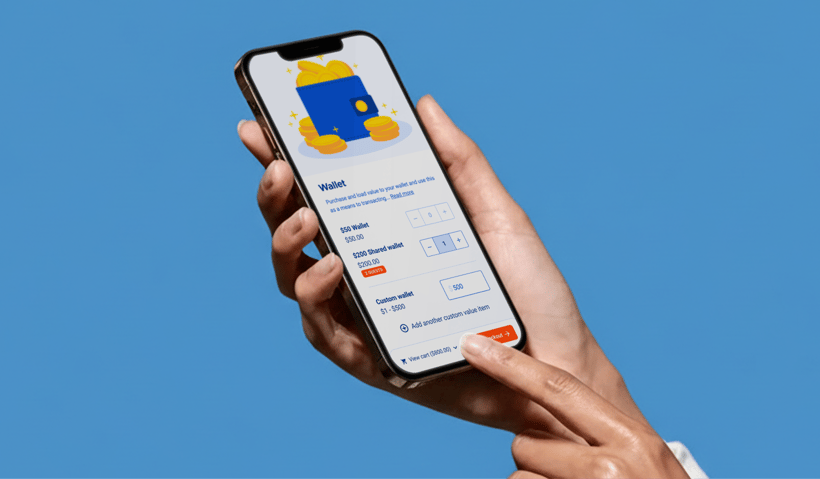
Your Saturday afternoon rush hits: Lines snake past the arcade, kids bounce at the trampoline park, and your POS drags through a slow chip card transaction while everyone behind checks their watches. Is that just the cost of going cashless? Thankfully, no, not all cashless payment systems are created equal.
The right system does more than ditch the cash drawer. For attractions and FECs, it speeds up queues with tap payments, encourages guests to spend more freely, and turns hours of end-of-day counting into a quick digital review.
In this article, we’ll cover everything you need to know about cashless payments as a venue operator, including why the right system matters, how it can boost revenue and guest satisfaction, and what to look for to implement it quickly and effectively.
What counts as a “cashless payment”?
Cashless payments are transactions completed without any physical cash. Instead, guests pay with tap-to-pay cards, chip cards, digital wallets, QR codes, direct debits, or RFID wristbands, and your venue records the transaction digitally through POS, kiosks, or mobile terminals. Let’s explore the main types of cashless payments that venues typically offer and how each enhances the guest experience.
Types of cashless payments
The main types of cashless payments for venues are tap-to-pay cards, digital wallets, QR code payments, account-based cards or wristbands, and direct debit for memberships or passes.
- Cards (contactless and chip): Many venues use cashless card systems, letting guests tap or insert a chip card to complete purchases in seconds. For example, a family checking in at your trampoline park can tap their Visa card to pay for jump sessions and grip socks to get to the fun sooner.
- Digital wallets (Apple Pay, Google Pay): Payments on smartphones and smartwatches are quick and secure. Tokenization replaces the card number with a one-time code for each transaction. For instance, a teen at your arcade might use Apple Pay to buy game credits without ever needing a physical card.
- QR payments: Guests scan a QR code displayed at your venue using their phone’s camera or banking app to complete a payment. For example, parents at a birthday party could scan a table-top QR code to add extra pizza and drinks to their order without having to get back in line.
- Account-based or RFID wristbands: Visitors preload funds onto a wristband or card linked to their venue account, then tap to pay throughout their visit. For example, water park guests can buy snacks or rent lockers with a simple wrist tap, all while staying in their swimsuits. You can learn about RFID wristbands here.
- Direct debit for memberships and passes: Recurring payments are automatically withdrawn from a guest’s bank account on a set schedule. For example, regular members pay monthly jump or climbing wall fees via direct debit, giving you predictable revenue without having to chase expired credit cards.
Each method serves a purpose. The key is choosing the right technology for the right moment in your guest journey, making payments seamless for both your staff and visitors.
Pros and cons of cashless payments
Here’s a breakdown of the key advantages and disadvantages of cashless payments for venues, from speed and convenience to security and fees.
Pros
- More convenient: Cashless payments make it possible to accept payments anywhere, and provide consumers with their preferred way to pay, improving service speed and increasing sales.
- Increased security: They are often more secure for consumers than carrying cash, with encryption and authentication protocols in place. Keeping less cash on hand also reduces the risk of theft and improves safety for employees.
- Easier record keeping: Digital cashless transactions are automatically recorded, making it easier to track revenue and reduce errors compared to cash handling.
- Fewer germs: Contactless payments minimize physical contact, helping keep both employees and guests safe in an increasingly hygiene-conscious world.
- Lower costs: Business owners benefit from reduced costs associated with handling and managing physical cash, such as cash mishandling by staff and transportation expenses.
Cons
- Digital vulnerability: Cashless payments can be susceptible to cyberattacks and fraud, which is why it’s important to choose a digital payment platform with high compliance and security standards.
- Financial exclusion: Not everyone can access or is comfortable with the technology required for cashless payments.
- Transaction fees: Some cashless methods charge transaction fees that can add up over time.
- Privacy concerns: Cashless payments may raise concerns about personal data and privacy.
NFC vs QR at venues: Which to use where
Choosing the right cashless payment technology for each area of your venue ensures faster service and happier guests.
|
Feature |
NFC (Tap) |
QR Code |
|
Speed |
Instant |
Slower (open app, scan, confirm) |
|
Hardware |
POS terminal or tap reader |
Display device, printed code, camera |
|
Cost |
Higher initial hardware |
Lower hardware, easy to deploy |
|
Connectivity |
Works offline on some terminals |
Requires internet for most setups |
|
Best Fit |
Turnstiles, snack bars, and POS checkouts |
Party rooms, pop-ups, table service |
Recommendation: Many venues run both. NFC at front-of-house and high-traffic points; QR for secondary locations where installing hardware isn’t cost-effective.
Fees, settlement, and reconciliation
Modern cashless payment solutions integrate POS, booking, and reconciliation to save hours of manual work each day. But cashless payments are not free, and knowing the cost structure upfront can save you from unpleasant surprises on your merchant statement. Here is a quick breakdown of typical fees:
- Interchange fees (set by card networks like Visa or Mastercard): usually 1.5 to 2.5 percent
- Processor markup: 0.3 to 1 percent, depending on your provider and transaction volume
- Fixed per-transaction fee: $0.10 to $0.30
- Monthly terminal fees: $10 to $50 per device
PCI compliance fees: $5 to $30 per month, sometimes included in your processor package
For context, a $50 ticket might cost around $1.75 in fees. A $5 ice cream could cost about $0.25. These percentages add up more on smaller transactions, which is why having a proactive strategy matters.
How to manage fees without stress
- Route low-value purchases toward payment methods with fixed fees rather than percentage-based fees when possible.
- Understand your processor’s batch settlement timing, which usually happens once per day, because it affects your cash flow.
- Check how tips and refunds are handled, as some processors charge different fees or have specific rules.
- Watch out for chargebacks. Chargebacks are when a customer disputes a transaction with their bank or card issuer. They are rare for face-to-face transactions, but if one happens, expect a $15 to $25 fee, even if you win the dispute.
The real advantage comes from integrated systems. When your POS, booking, and payments data flow into an integrated platform such as ROLLER, you do not spend hours reconciling shifts or tracking down discrepancies. The time saved on reconciliation often justifies the system cost on its own.
Security and compliance
You know what keeps venue owners awake at night? A data breach. The good news is that if you follow basic standards, they can absolutely be prevented.
PCI DSS: What you’re responsible for
PCI DSS stands for the Payment Card Industry Data Security Standard. It sounds complicated, but generally, it is all about keeping cardholder data safe. Here is what it means for venues:
Do's:
- Use secure, modern terminals
- Keep your payment software up to date
- Restrict access to payment systems to authorized staff
- Train employees on proper card handling
Don’ts:
- Do not store full card numbers on paper or unsecured devices
- Do not share login credentials
- Do not leave unattended terminals where guests can reach them
If you are using a modern, integrated payment processor, much of the heavy lifting, such as encryption and token handling, is already done for you. You are still responsible for physical security and staff practices.
Tokenization: Why tap and wallet payments are safer
Tokenization replaces your guest’s actual card number with a one-time digital token. When someone taps their card or pays with a digital wallet, the real card number is not transmitted or stored. Even if someone intercepts the transaction, the token is useless for future purchases.
This is why contactless and wallet payments are generally safer than traditional card swipes.
Quick device security checklist
- Keep payment terminals in supervised areas so guests always have a smooth and secure checkout experience
- Update software as soon as prompts appear
- Use strong, unique passwords instead of obvious ones such as “admin123” or your venue name
- Train staff to never write down card details
- Secure wireless terminals with WPA3 encryption
Most security issues don’t come from high-tech attacks. They usually happen when the basics get overlooked. Keep simple safeguards in place, stay consistent with best practices, and you’ll create a safer experience for your guests and your team.
Connectivity and offline planning
Picture this: it’s a busy Saturday, 300 guests are on-site, and your internet connection decides to take a break. What happens to your cashless payment system?
Modern terminals can queue transactions offline for a short period and process them automatically once connectivity returns. This works for brief outages or a few transactions, but extended downtime can hit authorization limits, so having a backup plan is essential.
Practical offline strategies:
- Keep a manual fallback and receipt options. Have at least one traditional cash register near your entrance, and use pre-printed receipt books or POS offline receipts to track transactions during downtime. This ensures both you and your guests have a record of purchases.
- Minimize transaction steps. Fewer steps mean faster processing and shorter queues when systems are limping along.
- Test your systems before peak days. Run simulations of full capacity on a quiet weekday to see how offline queues, receipt fallbacks, and mobile terminals perform. Adjust workflows and staff procedures as needed.
- Use mobile terminals with cellular backup. If the primary internet fails, they switch to 4G or 5G. The extra monthly cost is worth the peace of mind during peak Saturdays.
Planning for offline scenarios keeps your venue running smoothly, even when technology unexpectedly goes offline.
Preparing your team and guests
Choosing the right technology is only part of the picture. Helping your staff and guests learn how to use it well creates an even stronger experience for everyone.
Staff training that actually sticks
- Keep it simple. Your front-of-house team only needs to know three things: how to process a tap payment, what to do if a transaction fails, and how to explain the system to a confused guest. Save the detailed technical information for managers.
- Create micro-scripts to guide staff interactions. For example, “We accept cards and phones. Just tap here when you are ready.”
- Role-play tricky scenarios, such as handling a declined card politely, assisting a guest who only has cash, and directing guests who need extra help.
The goal is confidence and consistency. When staff are informed and know exactly what to say and do, lines move faster, and guests leave happier.
Guest education
Clear communication makes a big difference and makes guests feel more comfortable. Place large, simple signs at entrances stating: “Cashless venue. Cards, phones, and digital wallets accepted.” Include the same details on your website so guests can plan ahead.
Adding familiar logos like Visa, Mastercard, Apple Pay, and Google Pay helps guests understand their payment options at a glance.
For birthday parties or group bookings, include payment information in confirmation emails. Parents want to know in advance if they need to bring cash for snacks, add-ons, or extras. Clear guidance keeps everyone prepared and reduces confusion on the day.
Handling cash-only guests
Even in a cashless venue, some guests will still arrive without a card or wallet. Have a staffed POS near the entrance that can accept cash and load it onto a venue card or account. If that is not possible, clearly direct guests to the nearest ATM.
The key is to be helpful and friendly. Nobody should feel left out because they did not bring the correct payment method. A welcoming approach keeps everyone included and ensures a smooth experience for all.
Regional notes
If your venue operates in multiple markets, it’s important to remember that cashless payment terminology isn’t universal.
In Australia, contactless payments are often called “payWave” for Visa or “PayPass” for Mastercard, though most people just say “tap.” In the United States, it’s usually “tap to pay” or “contactless.” In the UK, venues stick with “contactless” almost exclusively.
QR code payments are extremely popular in Southeast Asia, especially in Thailand, Vietnam, and Singapore, where platforms like GrabPay and local banking apps dominate. In Western markets, QR payments are growing but remain secondary to card tap.
Some regions also have cash acceptance rules, particularly for government-run facilities or businesses over certain sizes. Make sure to check local regulations before going fully cashless.
Your implementation checklist
Ready to put your cashless payment system into action? Follow this step-by-step sequence to make it smooth and stress-free.
1. Hardware map
Identify all the terminals and devices your venue will need:
- Main POS stations: NFC-enabled terminals for quick tap payments
- Kiosks: Self-service cashless payment kiosks allow guests to buy tickets or add credits without waiting in line at the counter.
- Mobile stations: Wireless terminals with cellular backup for flexibility
- Wristbands or account-based systems: Ideal for turnstiles, party rooms, or cashless wristband programs
- Auxiliary areas: Decide whether NFC or QR works best based on traffic and usage
2. Payments configuration
Set up your system to handle common scenarios smoothly:
- Tipping: Enable where relevant; rules vary by jurisdiction
- Surcharging: Check local regulations if you plan to pass transaction fees to guests
- Receipt options: Offer email, SMS, or printed receipts for convenience
3. Staff training and accessibility checks
Make sure your team is confident, and guests feel supported by:
- Training them how to take cashless payments at POS, kiosks, and wristband stations to ensure smooth operations.
- Teaching them to troubleshoot any errors
- Role-playing common situations, like declined cards or cash-only guests
- Ensuring accessibility, so staff can assist anyone using kiosks, mobile stations, or wristbands
4. Test plan and go-live day playbook
Rehearse your system before your busiest days by:
- Running test transactions on every terminal
- Verifying offline mode queues and receipt fallbacks
- Checking reconciliation to confirm all transactions appear correctly in reports
- Confirming that refunds and reversals can be processed smoothly
- Create a playbook for go-live day, so staff know exactly what to do if issues arise
5. Create a standard operating procedure for reconciliation
Establish a clear routine for monitoring payments, for example:
- Daily: Review transaction batches and flag anomalies
- Weekly: Track chargebacks and analyze fees
- Monthly: Compare payment processor statements to your booking system
6. Post-launch metrics
After going live, track the following key indicators to measure success and optimize your operations:
- Queue time: Aim to reduce payment processing time and shorten lines
- Average transaction value (ATV): Cashless payments often increase overall guest spend
- Tips: Digital prompts and easy payment options can boost tip rates
- Refund resolution time: Make sure refunds and reversals are processed quickly to keep guests happy
- Chargeback rate: Monitor disputes carefully and keep the rate stable or decreasing; for face-to-face transactions, it should generally stay below 0.5%.
Next steps
Cashless payments aren’t a futuristic idea anymore. They’re simply what people expect when they walk into a venue. Guests want the convenience, and your operations benefit from faster transactions, higher spend, and less hassle managing cash. Doing it well means thinking through the details, like which technology fits each part of your venue, how to manage fees, what to do if systems hiccup, and how to guide your team and guests through the transition.
Book a demo to see how ROLLER can simplify your POS, bookings, and reconciliation in one seamless platform.
Frequently asked questions about cashless payments
What are cashless payments?
Cashless payments are transactions completed without exchanging physical cash. Instead of bills and coins, guests pay using tap-to-pay cards, chip cards, digital wallets like Apple Pay or Google Pay, QR codes, direct bank debits, or even RFID wristbands. For venues, this means guests can check in, buy snacks, or reload credits quickly at your POS, kiosks, or mobile terminals without using cash.
What are the main types of cashless payments for venues?
Most attractions and entertainment venues rely on a mix of cashless methods to keep lines moving and payments smooth. The main types include:
- Tap-to-pay (NFC cards or phones): The fastest option for front-of-house checkouts.
- QR code payments: Great for pop-ups, party rooms, or anywhere you don’t want to install extra hardware.
- Chip & PIN: A reliable backup when tap isn’t available or for higher-value purchases.
- Account-based cards or RFID wristbands: Guests preload funds and tap throughout their visit—ideal for arcades, water parks, and all-day access.
- Direct bank debits: Common for recurring memberships and monthly passes.
NFC vs QR: Which is better for attractions?
Both NFC and QR code payments work well, but for different reasons.
- NFC (tap-to-pay): Best for high-traffic areas like turnstiles, ticketing, snack bars, and POS checkouts. It’s the fastest and most seamless option, and many terminals can even process taps during brief offline periods.
- QR codes: A cost-effective, low-hardware solution perfect for party rooms, tableside ordering, seasonal areas, or pop-ups where you don’t want to install full terminals.
Are cashless payments secure?
Yes, modern cashless payments are very secure. Payment systems follow PCI DSS standards, which protect cardholder data, and most tap and wallet payments use tokenization, meaning the actual card number is never shared during the transaction. This significantly reduces fraud risk compared to handling cash.
To stay secure, venues should keep payment software updated, use modern terminals, restrict system access to authorized staff, and train employees on safe payment practices.
How do cashless systems improve guest experience?
Cashless systems remove friction from every part of the visit. Guests enjoy:
- Shorter lines thanks to fast tap-to-pay and self-service kiosks
- Faster check-ins and turnstile entry
- Easier tipping and bill splitting, especially in food and beverage areas
- More accessible options, like QR ordering or wristbands that work even when guests don’t have a wallet handy
What should venues budget for fees?
Most venues can expect a mix of percentage-based and fixed transaction fees, along with hardware or terminal costs. Card fees generally include interchange, processor markup, and per-transaction charges. Terminals carry a monthly fee, and some providers charge for PCI compliance.
To keep costs manageable:
- Route low-ticket items to lower-fee methods like NFC or QR.
- Use an integrated POS, which reduces reconciliation time and labor costs.
- Monitor chargebacks and settlement timing so there are no surprises on your statements.
A smart fee strategy helps you maximize cashless convenience without eating into your margins.
Related articles
.png)
Payments
Party Booking Trends That Will Shape 2026: Insights from the 2026 Benchmark Report
January 13, 2026
|
11 mins
.png)
Payments
Payment Trends That Will Shape 2026: Insights from the Attractions Industry Benchmark Report
December 9, 2025
|
11 mins
.webp)
.jpg)
.jpg)