You have 40 teenagers arriving in ten minutes, half haven't signed waivers, your best referee called in sick, and you just realized you double-booked the arena. Sound familiar? Running a laser tag venue means spinning multiple plates at once: Bookings, payments, staffing, waivers, and equipment checks. Drop one, and the whole experience falls apart. Fortunately, laser tag software is what keeps those plates in the air.
If you are a laser tag venue owner, a Family Entertainment Center (FEC) operator, or a multi-location operator actively evaluating software, this guide will help you make sense of your options. We’ll explain what laser tag software does, outline the features that matter most as you scale, and provide a practical framework for comparing systems based on operational fit rather than brand names.
What is laser tag software?
Laser tag software is a set of digital tools used to run and manage laser tag venues. It usually covers two areas: game control software that manages gameplay and scoring, and venue management software that handles scheduling, bookings, payments, and guest management.
It is helpful to understand the differences between the two categories of laser tag software, as they address different problems.
Game control software
This software connects directly to your laser tag equipment. It manages game modes, player scoring, team assignments, timing, and post-game results. This is typically supplied by the laser tag equipment manufacturer and emphasizes in-arena gameplay.
Venue management software
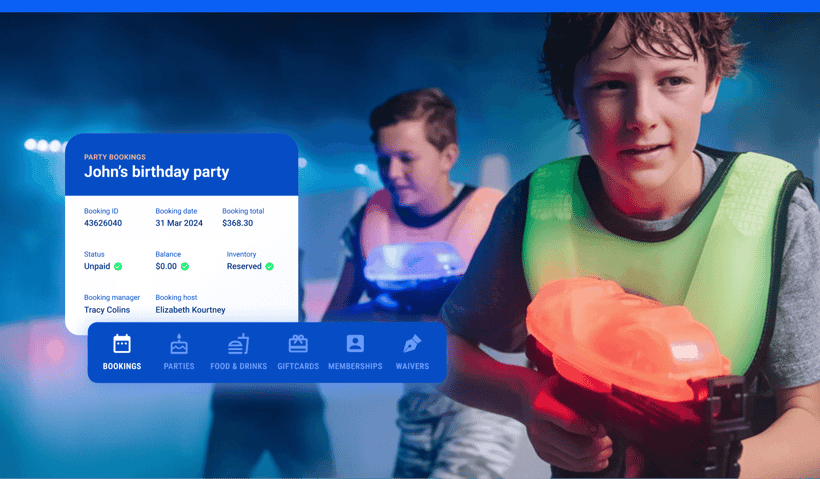
This software supports the business side of operations. It handles online bookings, party reservations, payments, waivers, memberships, reporting, and guest flow across the venue. It often integrates with game systems, but is not limited to laser tag.
Many venues use both. Game control software runs the experience, while venue management software runs the business.
Benefits of laser tag software:
When implemented well, laser tag software can:
- Reduce manual scheduling and front desk work
- Improve booking accuracy and capacity control
- Speed up check-in and payments
- Create a smoother guest experience
- Provide clearer reporting on revenue and performance
How laser tag software supports venue operations
Without software, many laser tag venues rely on whiteboards, spreadsheets, and manual coordination. As volume increases, this approach becomes harder to manage.
The table below highlights the difference between manual operations and software-driven operations.
|
Area
|
Manual operations
|
Software-driven operations
|
|
Scheduling
|
Staff track games manually and adjust on the fly
|
Games are scheduled automatically based on capacity and availability
|
|
Capacity
|
Risk of overbooking or underutilization
|
Capacity rules are enforced in real time
|
|
Payments
|
Separate POS or manual payment handling
|
Integrated payments tied to bookings
|
|
Guest flow
|
Check-ins are handled individually with paperwork
|
Digital check-in with waivers and prepayment
|
Software does not replace staff, but it gives staff better tools so they can focus on the guest experience rather than logistics.
Essential features to look for
Not all laser tag software offers the same capabilities. The right feature set depends on your venue size, complexity, and growth plans.
Game and session management
Laser tag venues need structured session control to keep games running on time and players moving through the arena efficiently. Look for laser tag management software that helps you:
- Schedule games with defined time slots
- Assign players or groups to sessions
- Coordinate laser tag sessions with other attractions
This is especially important for venues with multiple arenas or shared staffing.
Online bookings and reservations
Online booking tools allow guests to reserve and pay for laser tag sessions before arrival. This type of laser tag reservation software reduces front desk workload and improves capacity control. Look for laser tag booking software features that support:
- Real-time availability
- Prepayment options
- Mobile-friendly booking flows
- Automated confirmation emails
This reduces front desk pressure and improves conversion.
Party and group booking workflows
Parties and group events require more coordination than standard bookings. Look for workflows that make it easier to manage:
- Party package creation
- Deposit and balance handling
- Automated reminders and instructions
- Add-ons such as food or extra games
Dedicated group workflows save time and reduce errors.
Memberships tools
Memberships and loyalty programs encourage repeat visits and predictable revenue. Look for tools that enable:
- Recurring memberships
- Visit passes or bundles
- Points or rewards tracking
These features are especially valuable for Family Entertainment Centers and multi-attraction venues.
Point-of-sale (POS) and payments
An integrated POS connects bookings, check-in, and transactions in one place. Look for payment features that include:
- Support for multiple payment methods
- Unified reporting across sales channels
- Refund and adjustment handling
Disconnected systems often lead to reconciliation issues.
Digital waivers
Digital waiver tools help streamline safety documentation and speed up check-in. Look for systems that offer:
- Online completion before arrival
- Kiosk or mobile signing on site
- Automatic guest linking to bookings
This improves safety compliance and speeds up check-in.
Reporting and analytics dashoards
Reporting tools provide insight into how your laser tag operation is performing. Look for analytics that give you visibility into:
- Revenue by attraction or session
- Booking lead times
- Utilization and capacity metrics
- Party and group performance
Clear reporting supports better staffing and pricing decisions.
How to compare laser tag software systems
Choosing the right software can feel overwhelming. The best way to evaluate your options is to ask purposeful questions based on how you operate today and where you want to be tomorrow. Use the questions below to guide demos, proposals, and team discussions:
Does the software depend on specific hardware?
Some systems only work with certain laser tag equipment or require proprietary hardware. Make sure the software integrates with your existing setup or that any required upgrades fit your budget and timeline.
Can it scale with your business?
Think beyond your current volume. Will the software handle peak times, expanded offerings, seasonal spikes, and new pricing models without adding complexity? A scalable system saves you from outgrowing your tools too quickly.
Can it support multiple locations?
If you operate more than one venue or have plans to expand, look for software that offers centralized management. This includes shared reporting, unified bookings, and consistent guest experiences across all sites.
Will it work with your other systems?
A strong integration ecosystem means the software can talk to your point of sale, payment processor, waiver tools, marketing platforms, and other tools. Good integrations reduce manual work and keep data consistent.
Is it easy to use?
The best software is intuitive for your team and simple for guests. During demos, test both back-end and front-end workflows. If staff struggle or customers find booking confusing, you will see friction in daily operations.
What kind of customer support is available?
Ask about hours, channels (phone, email, chat), and whether there is a dedicated account manager or online help resources.
Can you try it before you buy?
Free trials or guided demos let you test real workflows and see how intuitive the system really is.
Laser tag software for different venue types
Different types of venues have unique operational needs, and the right software should fit those needs rather than forcing you to adapt your processes.
Single-site laser tag operators
For single-site operators, simplicity and reliability are key. You want a system that can run your games smoothly, manage bookings efficiently, and handle payments without extra complexity. Features like session scheduling, party management, and online booking are often enough to cover most operational needs.
Focus on: Ease of use, fast check-in, and dependable game management.
Family Entertainment Centers (FECs)
FECs typically offer multiple attractions beyond laser tag. In these environments, software needs to handle cross-attraction bookings, integrate payments across attractions, and give staff clear visibility into guest flow. The ability to bundle passes or manage group experiences across multiple activities is particularly valuable.
Focus on: Unified booking and POS, reporting across attractions, and flexible scheduling.
Multi-location operators
Operators with multiple sites face unique challenges. Software must support centralized control, consistent guest experiences, and shared reporting across locations. Multi-location tools also help streamline staffing, pricing updates, and promotions across all venues, saving time and reducing errors.
Focus on: Scalability, centralized reporting, consistent workflows, and multi-site integrations.
Common mistakes to avoid when choosing laser tag software
Even experienced operators can make avoidable mistakes when evaluating laser tag venue software. Being aware of these pitfalls helps you select a solution that truly supports your business.
Over-optimizing for hardware
Focusing only on flashy game features or proprietary hardware can leave gaps in booking management, payments, or guest flow. Prioritize operational fit over gadgets.
Ignoring the guest experience
Complicated booking flows, long check-in lines, or confusing online interfaces hurt guest satisfaction. Software should make the experience smoother, not more cumbersome.
Underestimating reporting and analytics needs
Without good reporting, you can’t make informed staffing, scheduling, or pricing decisions. Make sure you have access to real-time and historical data.
Choosing based solely on short-term cost
Cheaper solutions often come with hidden fees, limited scalability, or a lack of support. Consider long-term value and flexibility, rather than upfront price alone.
Neglecting training and support
A system with all the right features can still fail if staff aren’t properly trained or support is hard to reach. Ask about onboarding, documentation, and customer support before committing.
Overlooking integrations
Standalone software may not connect with your POS, payment processors, marketing tools, or waiver systems. Lack of integration can create extra work and errors over time.
Choosing software that grows with your venue
The best laser tag center software supports both today’s operations and tomorrow’s growth. It should reduce manual work, improve guest experience, and give you the data needed to make confident decisions.
Rather than choosing software based on a single feature or price point, focus on flexibility, scalability, and how well the system fits your overall venue strategy.
Platforms like ROLLER are often considered by operators looking for an all-in-one approach to bookings, payments, waivers, and reporting across laser tag and other attractions. Exploring solutions with a long-term mindset can help ensure your software grows alongside your venue.
Book a demo to see how ROLLER can help your laser tag venue thrive.



.png)
.webp)
.jpg)
.jpg)